Analytics that show who pays.
Visitors, sources and Stripe revenue on one map. Free to start.
Free plan, no time limit · No card · Stripe stays read-only
The short answer
Revenue analytics records where each visitor came from and matches the ones who pay in Stripe back to that first visit. You see revenue per source, revenue per visit and paying customers on a map, not page views alone. Nordva Launch does it with one script tag and a read-only Stripe key, on every plan including Free.
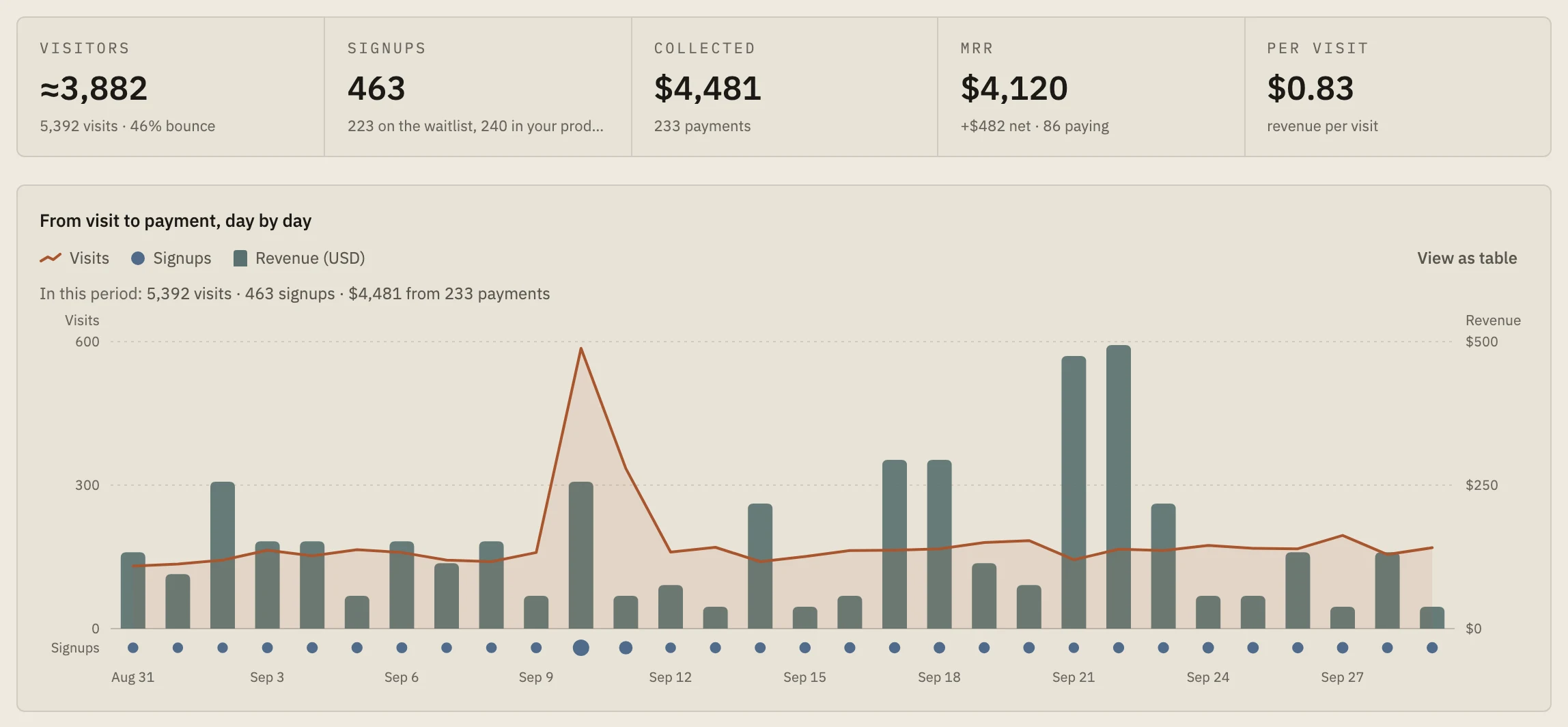
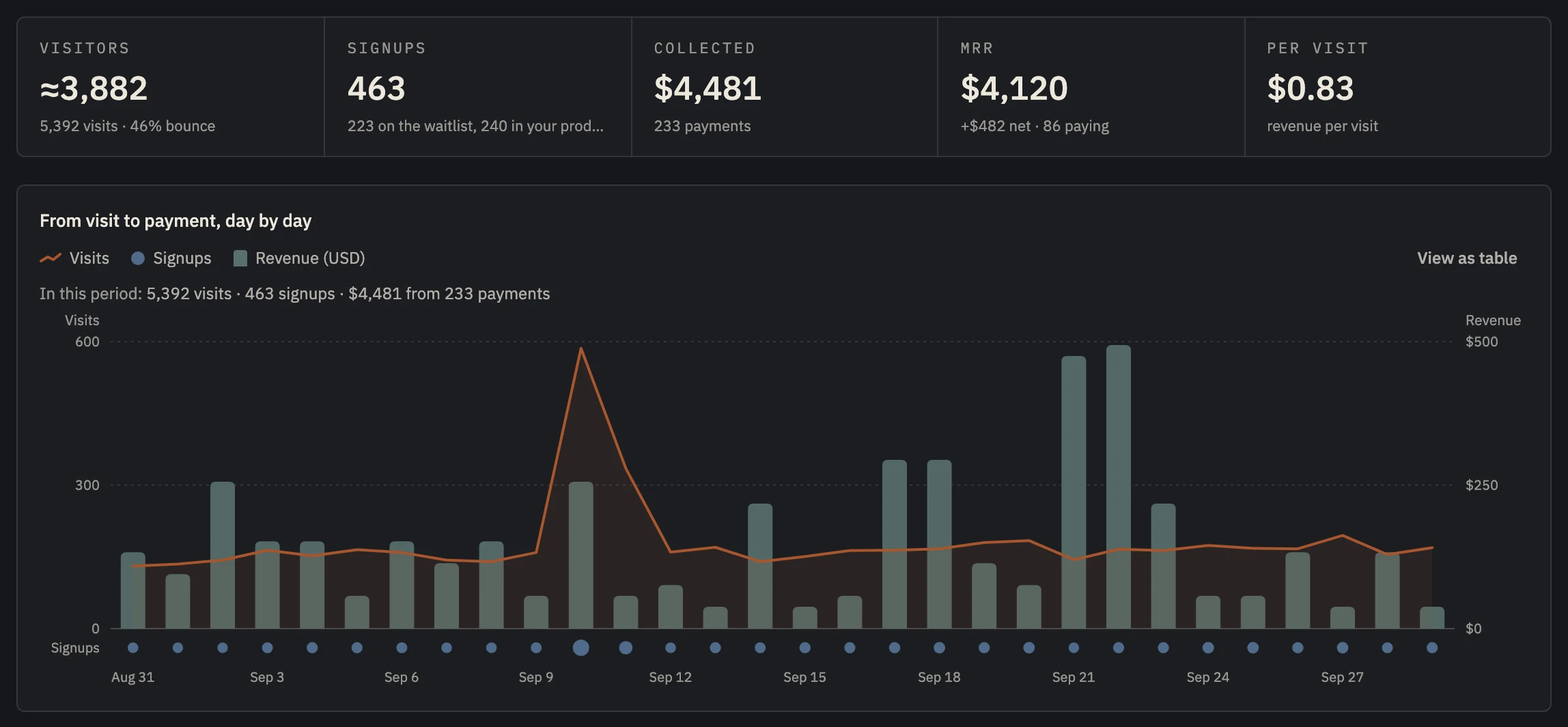 Example data
 - Visitors, from one script tag.
- Payments and MRR from Stripe, read-only.
- What one visit is worth.
- Revenue on the same timeline as visits.
Page views don't pay the rent.
Classic analytics counts visits. A channel can send thousands of visitors who never pay, and a small one can send the customers who keep you going. On a traffic chart, the first looks like the winner.
Put revenue next to visits and the picture changes. Revenue per visit tells you what a visitor from each source is worth, and so what you can afford to pay for one.
The map makes it concrete: where your visitors are, and where your paying customers are. Often those aren't the same places.
What to look for in revenue analytics.
- 01
Revenue per source
Paying customers and revenue grouped by the first source of each customer, not just signups.
- 02
Revenue per visit
Revenue divided by visits: the ceiling on what a click can cost you.
- 03
A match rate
How many paying customers the tool could trace to a first visit, so you know how complete the numbers are.
- 04
Privacy you can explain
Cookies only where your visitors allow them, and no IP addresses stored.
Visits and revenue on one timeline.
Launch's Insights page puts visits, signups and Stripe revenue on one chart, lists paying customers by source and by country with the share it could trace, and shows what each visit is worth. It reads Stripe with a restricted key and can only read.
Tracking modes decide, per visit, whether a cookie may be set. In the default mode, visitors in the EEA, the UK and Switzerland get one only after your consent banner says yes.
Set up in about five minutes.
- 01
Paste one line
About two minutes
Add the script tag to your site, or run npx nordva@latest init and let your AI coding agent wire it in. The first visit shows up within a minute.
- 02
Connect Stripe, read-only
About three minutes
Create a restricted Stripe key with read permissions and paste it. Launch can only read; disconnecting deletes everything it synced. Every plan, Free included.
- 03
See who pays, and why
From the first visit
Where visitors come from, which of them sign up, what they ask you for, and which source brought the ones who pay, on one record per person.
I spent two years building apps before I understood how much three things matter, and that they only matter together: who your users are and where they came from, what they ask you for, and which source and which ad brought the ones who pay.
Most people starting out don't know that yet. I didn't. Together, those three tell you what to build next and where to spend your time and money. Nordva Launch puts them on one record per person, from the first visit to the first payment.
We only get paid if you succeed, so this site teaches first.
When Launch is the wrong tool.
- You bill through something other than Stripe: Launch reads Stripe only.
- You need product analytics inside your app (feature usage, retention cohorts): a product analytics tool fits better.
Questions, answered.
How is this different from Google Analytics?
Google Analytics counts visits and the conversions it can see; it doesn't read your Stripe account. Launch matches the customers who actually paid to the first visit that brought them.
Does the script slow my site down?
It's a small file loaded with defer, so it never blocks your page from rendering, and it sends one small request per page view.
What does the free plan include?
Up to 10,000 analytics events a month, one Stripe connection with 30 days of history, one funnel, a waitlist of 100 signups, and the API and MCP server.
See who pays, and where they came from.
Start free: one script tag and a read-only Stripe key.