Visitors, but no sales?
See where they drop off, and where they came from.
Free plan, no time limit · No card · Stripe stays read-only
The short answer
Either the visitors aren't the right people, or something on the way stops them. Check sources first: visitors from a channel full of the wrong audience won't buy however good the page is. Then build a funnel from landing page to pricing to signup: the step that loses the most people is the one to work on first.
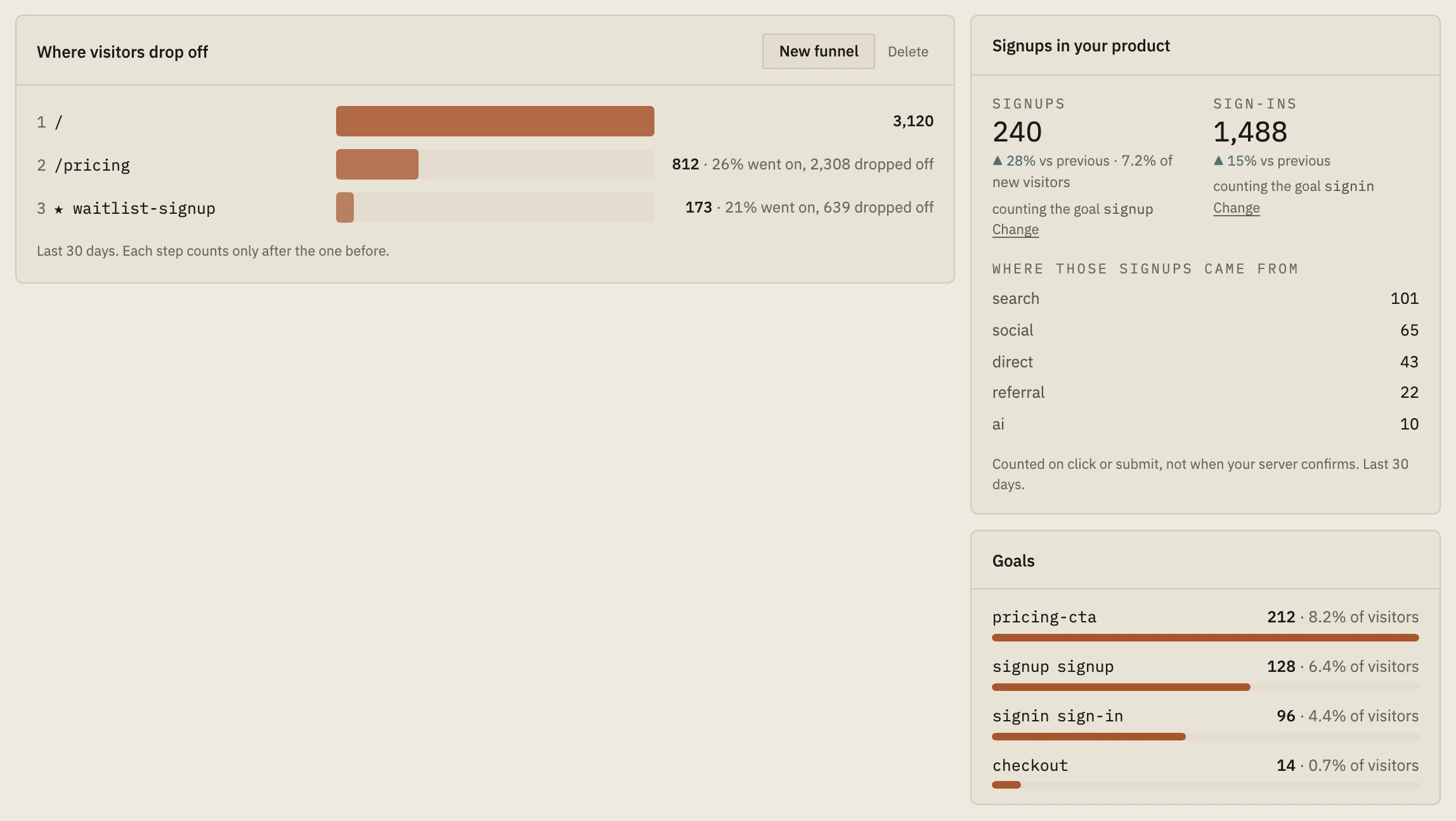
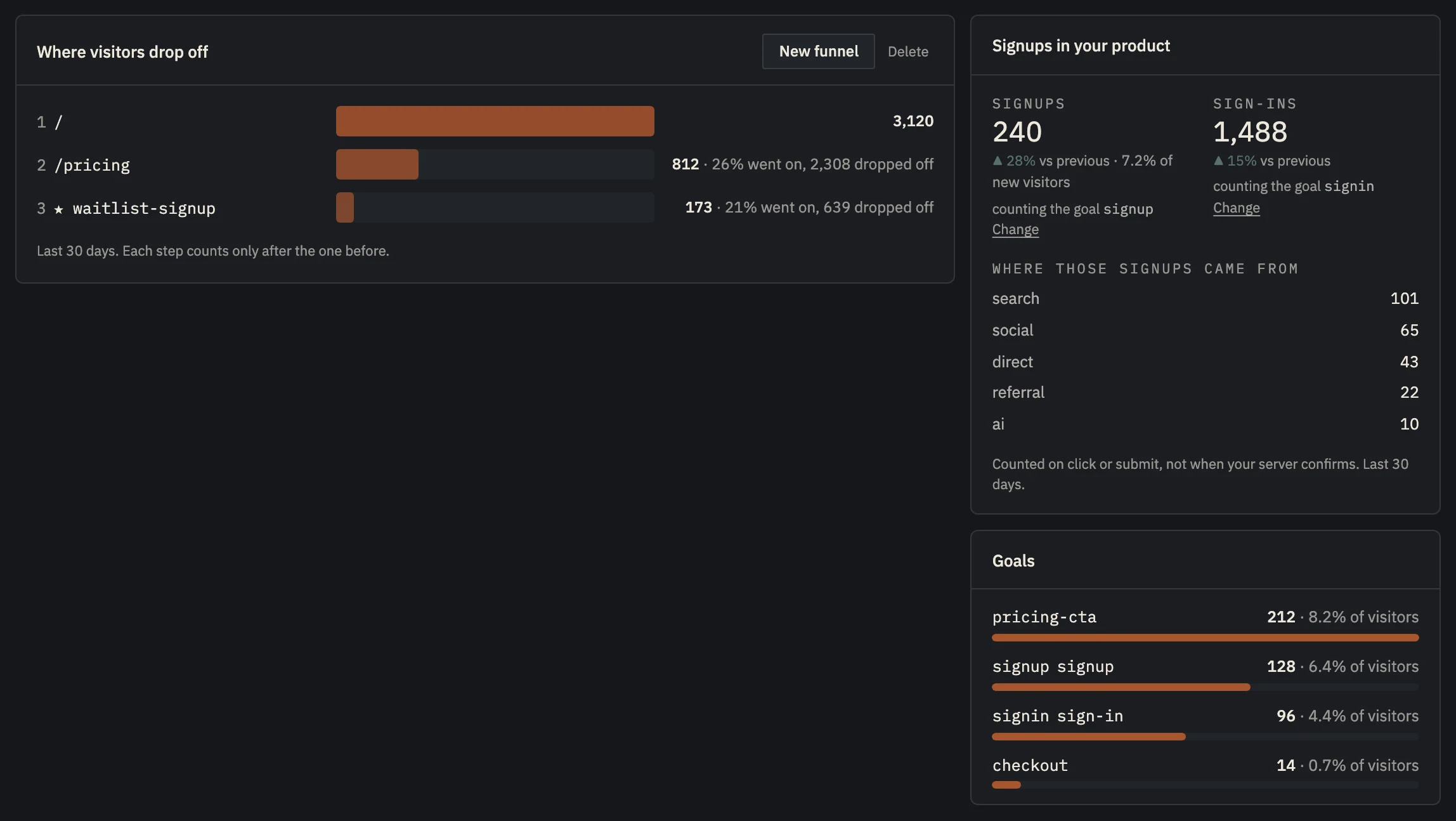 Example data
 - How many went on from each step, and how many dropped off.
- Goals: the actions you tagged, and who reached them.
No sales is a symptom with two causes.
Traffic that doesn't convert is either the wrong traffic or a leak in the path. They need opposite fixes: a different audience, or a better page.
Sources tell you about the audience. If one channel's visitors sign up and another's never do, the page is fine and the second channel is sending the wrong people.
A funnel tells you about the path. Put the steps in order (home, pricing, signup) and count how many visitors reach each. Often most of the loss sits at one step: that's the one to fix.
Find the leak.
- 01
Split visits by source
Compare how often each source's visitors sign up. Drop or rework the channels whose visitors never do.
- 02
Tag the actions that matter
The pricing button, the signup, the checkout: name each one as a goal.
- 03
Build a funnel
Home → pricing → signup. Count the visitors who reach each step, in order.
- 04
Fix the worst step first
If people leave at pricing, look at the offer. If they leave at signup, shorten the form.
Funnels and goals, from one script tag.
Tag any button with data-nordva-goal="signup" (no JavaScript needed) and Launch counts it. A funnel follows visitors through your steps in order and shows how many went on and how many dropped off at each. The sources table shows which channels send visitors who sign up.
Following one visitor from step to step needs a visitor id, which Launch keeps only where your tracking mode and the visitor's consent allow. Without one, the funnel shows each step's totals and says so.
Free includes one funnel of three steps; Indie five funnels of five steps; Builder 25 of eight.
Set up in about five minutes.
- 01
Paste one line
About two minutes
Add the script tag to your site, or run npx nordva@latest init and let your AI coding agent wire it in. The first visit shows up within a minute.
- 02
Connect Stripe, read-only
About three minutes
Create a restricted Stripe key with read permissions and paste it. Launch can only read; disconnecting deletes everything it synced. Every plan, Free included.
- 03
See who pays, and why
From the first visit
Where visitors come from, which of them sign up, what they ask you for, and which source brought the ones who pay, on one record per person.
When Launch is the wrong tool.
- You need session recordings or heatmaps to see what visitors clicked on a page: use a tool like PostHog or Hotjar next to Launch.
Questions, answered.
What's a funnel?
The steps you want visitors to take, in order, and how many reach each one. The biggest drop between two steps is where you lose the most people.
How many visitors do I need for a funnel to mean something?
Enough that each step's number isn't a handful of people. Until then, look at sources and talk to visitors instead.
Does it need cookies?
Following one visitor through the steps needs a visitor id, kept in a first-party cookie only where your tracking mode and the visitor's consent allow. Without it, you still get each step's totals.
Find the step that loses them.
Start free: one script tag, one funnel, and an answer after a few days of traffic.